



For healthcare organizations, providers, and patients

Telehealth Software Platform

The CureCompanion platform is the software that runs our telemedicine carts, telemedicine kits, and remote patient monitoring home kits. It drives the exam devices during the visit, keeps the patient record, and connects to your EHR.

It goes beyond basic video visits: your own providers examine the patient's skin, eyes, ears, and throat, listen to heart and lung sounds in real time, and get vitals and diagnostics, with the help of a nurse or assistant at the patient's side.

Software-only plans work with the computer and webcam you already own; add a starter telemedicine kit for exam devices.

Since 2015  ·  Austin, Texas  ·  Customers in 20+ states and 12+ countries

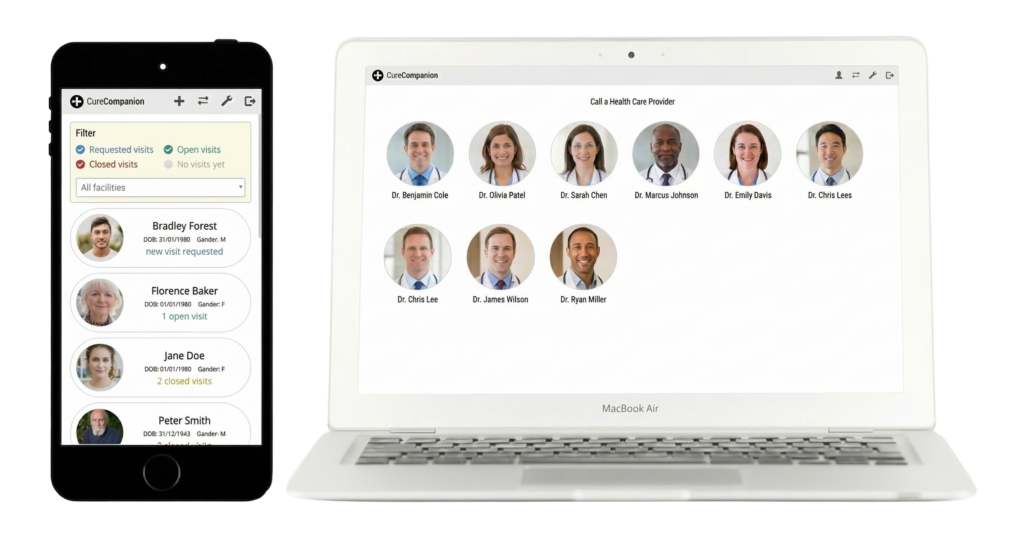
CureCompanion software platform shown on mobile phone and laptop screens
Video visits Virtual examination Patient records Remote patient monitoring White label option
Trusted by healthcare organizations across the US and overseas
Features

Telemedicine software features

Video visits, virtual examination with connected devices, patient records and notes, remote patient monitoring, AI documentation, and administration, in one application your staff learn once.

Modern, Simple User Interface

Fully supported on iOS, Android, tablet, PC, and Mac. Intuitive user interface requires minimal training.

Provider, Staff, Patient Accounts

Provider can connect directly with the patient or with a nurse/assistant on behalf of the patient.

Telehealth Video Visits

Telehealth visits in secure HD audio/video. Scheduled or instant visit workflows, single-click visit creation.

Virtual Examination and Auscultation

Examine skin, eyes, ears, throat, and listen to heart/lung sounds using our telemedicine hardware.

Telehealth equipment →

Remote Patient Monitoring

Patients record vitals at home and care team monitors remotely. Integrated RPM and telemedicine workflow.

Remote patient monitoring →

Real-Time AI Analysis

Ambient listening AI for automated progress notes, customizable post-visit AI assessment.

Available on the platform

White Label Option

Get our robust telemedicine platform under your own brand, fully operated and supported by us.

Many More Features

Email and SMS notifications, admin dashboard, third-party integrations and more.

Platform details →
Virtual examination and auscultation, not just video calls

How a visit works on the telehealth platform

With a basic video platform, the remote provider has only the patient's own description to go on. On the CureCompanion platform, the provider examines the patient's skin, eyes, ears, and throat, listens to heart and lung sounds, and gets vitals and diagnostics, with the help of a local nurse or assistant.

01

Create the visit

On-site staff sign in and start an instant visit with one click, or schedule it for later; the patient gets the join link by email or SMS, with reminders before the visit. Providers can create visits too, and patients can request one.

02

Join from anywhere

The provider joins from a web browser on a PC, Mac, tablet, or phone, wherever they are. A specialist or family member joins with the visit link, so three or more people can be on the call.

03

Examine

Activate the stethoscope, otoscope, or exam camera on the cart or kit and the software detects it and streams it to the provider. Heart and lung sounds stream live, and recordings can be saved to the patient record.

04

Capture vitals and diagnostics

Bluetooth vitals and the 12-lead ECG write into the patient record without manual entry, and the patient's history, medications, and allergies are open beside the video.

05

Document and sign

The visit note is written in SOAP format or with the forms your facility defines; AI documentation that drafts the note from the visit conversation is available on the platform. The provider reviews, edits, and signs the visit.

06

Follow up

The note, images, sounds, and readings stay in the patient record. Schedule a follow-up, message the patient, and post the note to the EHR where integrated.

Video-only visit vs CureCompanion visit


Exam Video-only visit CureCompanion visit

Skin and wounds

A webcam view, with lighting and angle set by the patient.

Handheld exam camera with adjustable LEDs and close focus, streamed live to the provider.


Ears, nose, and throat

Not examinable; the patient describes the symptoms.

Video otoscope streams the ear canal, eardrum, nose, and throat in HD.


Heart and lungs

The patient reports how they feel.

Digital stethoscope streams heart and lung sounds for live auscultation, with recordings saved to the record.


Vital signs

Home readings read aloud and typed in later, if the patient has the devices.

Blood pressure, pulse oximetry, temperature, and spirometry captured on site; readings go straight into the record.


ECG

Not available; the patient travels for a tracing.

12-lead ECG at the point of care, with the report in the visit record.


Documentation

Notes typed afterwards into another system.

The note is written in the visit record with the readings beside it, AI documentation available, and signed by the provider.


Workflows are modeled on in-person visits, so staff run the visit after a 60 to 90 minute remote training session, and your own providers see the patients.

What the platform does

Everything in the telehealth software platform

The detail behind the feature list: what each part of the platform does for providers, on-site staff, patients, and administrators.

Video visits


Secure HD video in a web browser on PC, Mac, Android, iPhone, and iPad, with nothing to install


Instant visits with one click, or scheduled visits with email and SMS join links and reminders


The provider meets the patient directly, or works with a nurse or assistant at the patient's side; guests join by link


Pre-call camera, microphone, and network check; in-visit messaging saved to the visit record
Virtual examination


One-touch device switching: the stethoscope, otoscope, or exam camera streams to the provider the moment it is activated


Live heart and lung sounds, with recordings saved to the patient record


Bluetooth vitals and the 12-lead ECG write into the patient record without manual entry


Runs our telemedicine carts and kits; a software-only plan works with your own computer and webcam

Records and documentation


Patient records: demographics, conditions, allergies, medications, surgeries, family and social history, vitals, ECG, spirometry, images, and lab reports


Visit notes and progress notes in SOAP format; review-of-systems and custom forms your facility defines


Provider signature closes the visit; per-patient visit history, with the visit list exportable to a spreadsheet


EHR integration via SMART on FHIR and PointClickCare

Remote patient monitoring


Patients record blood pressure, oxygen saturation, and glucose at home, and the care team monitors remotely


Readings land in the same patient record, with per-patient trends for the care team


A telemedicine visit launches from the same record, with the vitals history in front of the provider

Remote patient monitoring →

AI documentation


AI documentation that drafts the note from the visit conversation, in SOAP format


The provider reviews and edits every AI draft before signing


Facility-defined post-visit assessments track outcomes your organization chooses, such as a readmission prevented or a school absence avoided

Available on the platform

Administration and notifications


Admin dashboard: providers, staff, patients, and administrators per facility; subscription and billing per organization


Roles for organization admins, facility admins, providers, staff, patients, and guests


Email and SMS notifications: visit scheduled or rescheduled, reminders, visit requests, messages, and when the patient joins


White label: the software can carry your program's name, operated and supported by us

One software platform

One telehealth platform for carts, kits, and remote patient monitoring

Carts, kits, and RPM home kits run on the same CureCompanion software, so one license per organization covers every site and every patient stays in one record. The platform drives the devices during the visit, keeps the record, and connects to your EHR.


Encrypted video visits from a web browser on PC, Mac, Android, iPhone, and iPad.


One-touch device switching: activate the stethoscope, otoscope, or exam camera and the software detects it and streams it to the provider.


Bluetooth vitals and the 12-lead ECG write into the patient record without manual entry.


Patient records, visit notes, and progress notes in one place.


EHR integration via SMART on FHIR and PointClickCare.


AI documentation that drafts the note from the visit conversation, and facility-defined post-visit assessments, available on the platform.


White label: the software can carry your program's name.

See the telehealth equipment it runs

Minimal training, your own providers

Workflows are modeled on in-person visits. Remote training runs 60 to 90 minutes per team, with refreshers available, and your own providers see the patients.

Security and compliance

HIPAA compliant with a Business Associate Agreement: AES-256 encryption at rest, TLS 1.2+ in transit, access controls, audit logging, and automated daily backups.

One license, one patient record

One license per organization covers telemedicine kits, carts, and remote patient monitoring. Add carts or home kits later and they share the same patient record.

One contract One BAA One login One patient record One support line One vendor in your budget
Hardware it runs

Telemedicine carts, kits, and home kits on one platform

Every configuration runs the same software and shares one patient record. Most programs mix them: carts at the main site, kits wherever the visit moves, home kits for patients between visits.

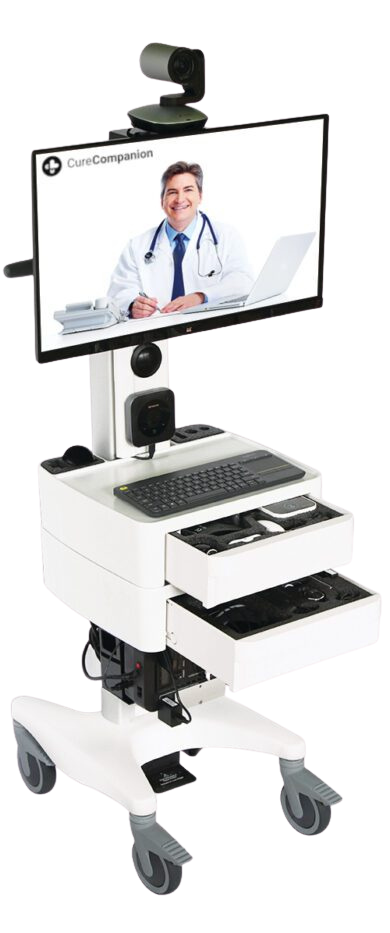
Telemedicine cart containing a 27" 1080p HD display, PTZ 1080p HD webcam, conference audio, and a comprehensive set of medical devices.
Telemedicine cart

Telemedicine Cart

Hospital-grade workstation that rolls to the bedside: 27-inch 1080p display, pan-tilt-zoom 1080p HD camera, conference-grade audio, medical-grade battery backup (UPS).


Nine integrated medical devices, configured per facility; video-only configuration available


For inpatient units, emergency departments, and facility exam rooms

Telemedicine cart →
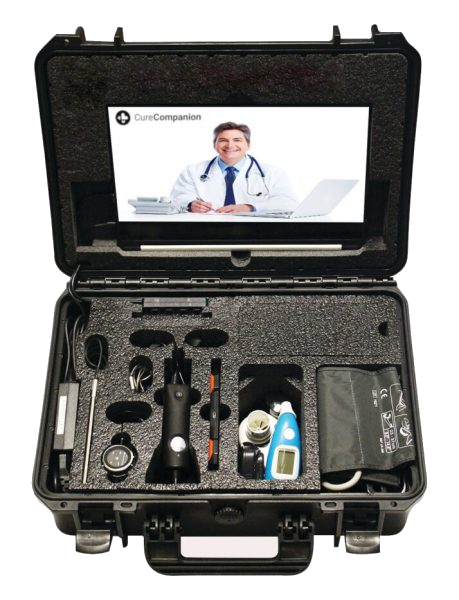
Telemedicine kit including a 14" touch-screen tablet, 1080p HD webcam, 8+ hour battery life, and a comprehensive set of medical devices.
Telemedicine kit

Telemedicine Kit

The same exam devices in a 20 lb IP-67 rated case: 14-inch touchscreen tablet, 1080p HD webcam, 8+ hour battery.


Nine integrated medical devices: stethoscope, exam camera, otoscope, 12-lead ECG, vitals devices, spirometer


The same exam devices as a cart at lower hardware cost

Telemedicine kit →
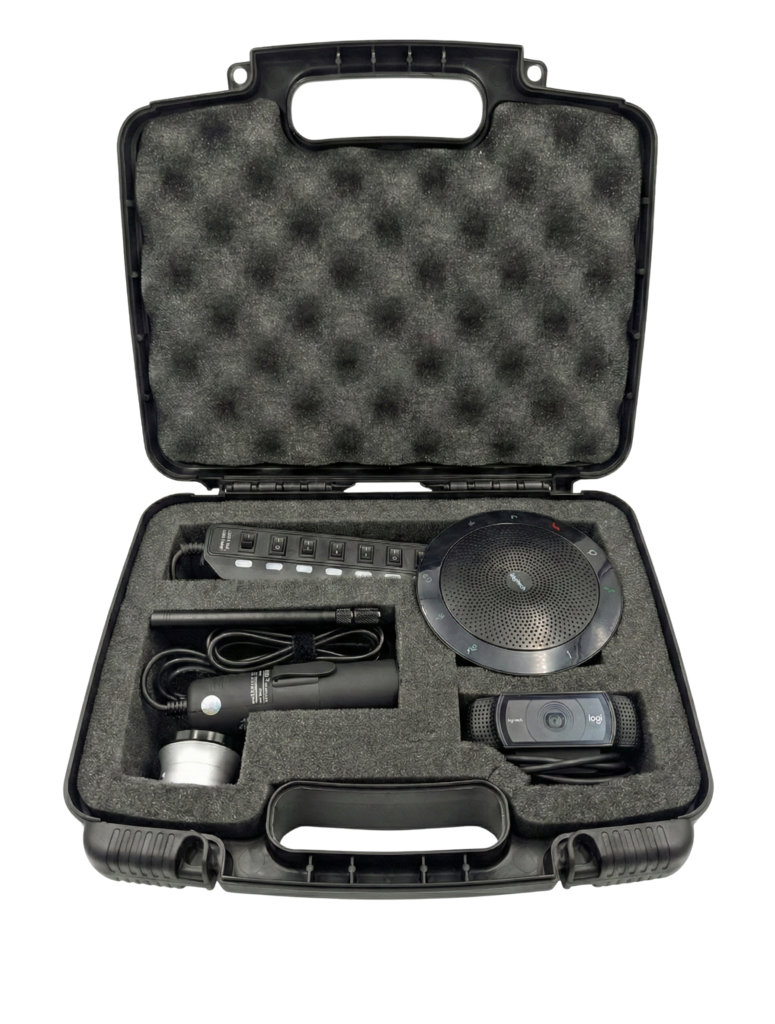
Starter telemedicine kit containing handheld exam camera, stethoscope, otoscope, and audio/video equipment.
Starter telemedicine kit

Starter Telemedicine Kit

Exam camera, otoscope, stethoscope, HD webcam, and speakerphone in a 12-inch case, for the laptops and tablets you already own.


Plugs into your existing computer by USB


Runs on the CureCompanion platform, quoted with the software plan

Starter telemedicine kit →
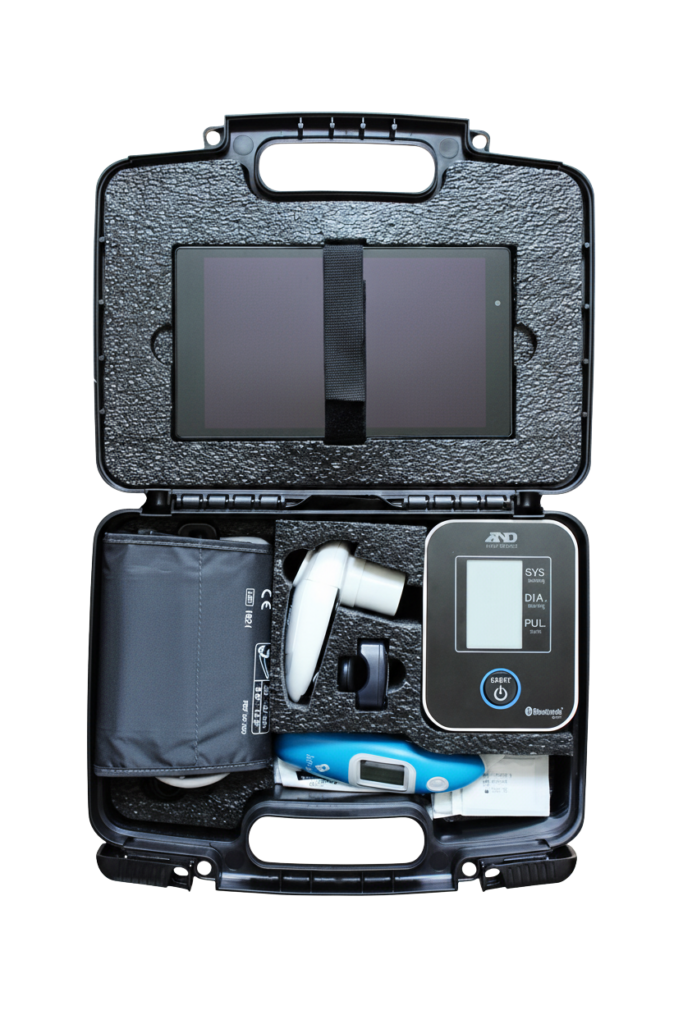
RPM kit containing blood pressure monitor, pulse oximeter, glucometer, and touch-screen tablet.
Remote patient monitoring kit

Remote Patient Monitoring Kit

A cellular tablet with a three-button patient app, and Bluetooth blood pressure monitor, pulse oximeter, glucose meter, and weight scale as needed.


Readings go to the care team on the same platform


Kits are reusable: your staff reprocess and reissue them

Remote patient monitoring →

We integrate third-party devices; we do not manufacture them. A software-only plan works with the computer and webcam you already own.

All telehealth equipment →
Where it is used

Telemedicine software for rural hospitals, clinics, skilled nursing facilities, and schools

The same platform serves very different programs, each with its own providers, workflows, and equipment mix.

Hospital inpatient units and emergency departments

Tele-stroke, cardiology, pulmonology, and hospitalist coverage from a cart at the bedside.

Telemedicine cart →

Chronic care and remote patient monitoring

Patients with heart disease, diabetes, COPD, or hypertension record vitals at home; a visit launches from the same record.

Remote patient monitoring →

Urgent care, in-home visits, mobile vans, and remote worksites

A portable kit brings the exam room to the patient, with the on-site nurse or medic handling the devices.

Telemedicine kit →

The most cost-effective way to run telemedicine is with your own existing providers and specialized technology from a vendor like us: your clinicians provide the care, CureCompanion provides the technology.

Setup, training, licensing

Deploying the telehealth software: setup, training, and licensing

Sign your organization up online, or ask for a demo and we set up facilities, users, devices, and integrations with you.

Setup and ownership


Getting started

Self-serve sign-up for your organization online, or a demo and a quote; we configure facilities, users, and integrations with you.


Training

Remote, 60 to 90 minutes per team, with refreshers available.


Devices

Runs on our telemedicine carts and kits; a software-only plan works with your own computer and webcam.


Network

About 1 Mbps per visit, 4 to 5 Mbps recommended; no dedicated circuit or static IP.


Licensing

Software is licensed per organization, not per facility or per user; hardware is purchased outright with no recurring hardware charges.


Support

Email and phone support; 12-month warranty on hardware.


Integrations and options


EHR integration via SMART on FHIR and PointClickCare


Bluetooth vitals monitors; USB exam camera, otoscope, and digital stethoscope; 12-lead ECG and spirometer


Email and SMS notifications for providers, staff, and patients


White label: your logo, name, and domain on the web app, operated and supported by us


Third-party integrations on request

Grant-funded programs

We supply equipment and software to USDA DLT grant recipients, state telemedicine programs, and organizations putting Rural Health Transformation Program funds to work, with the quotes and specifications an application needs. How we fulfill RHTP telehealth, RPM, and AI expectations →

Eligibility and allowable costs are set by each program and state. We support the vendor side of your application.

Why CureCompanion

Why organizations choose the CureCompanion platform


Since 2015

Designing, integrating, and supporting telemedicine systems from Austin, Texas.


20+ states

Customers across 20+ states and 12+ countries, from rural hospital districts to school-based health centers.


One platform

Telemedicine visits, remote patient monitoring, and AI documentation on one platform with one patient record.


One vendor

Hardware, software, 12-month warranty, remote training, and support from the same team.

About CureCompanion →
Questions

Telehealth software platform FAQ

The questions clinics, hospitals, nursing facilities, and schools ask before they request a demo.

What is a telehealth software platform?

A telehealth software platform is the application that runs a telemedicine program: secure video visits, scheduling and notifications, the patient record and visit notes, and the connections to exam devices, remote patient monitoring, and the EHR. The CureCompanion platform is the same software that runs our telemedicine carts, kits, and RPM home kits.

How is CureCompanion different from a basic video visit tool?

A video-only tool shows the provider a webcam view and the patient's own description. On the CureCompanion platform the provider examines skin, eyes, ears, and throat, listens to heart and lung sounds live, and gets vitals and diagnostics through the connected devices on a cart or kit, with everything saved to one patient record. Your own providers see the patients.

Which devices and browsers does the telemedicine software run on?

It runs in a web browser on PC, Mac, Android tablets and phones, and iPhone and iPad (Safari), with nothing to install, and it comes preloaded on our telemedicine carts and kits. A pre-call check tests the camera, microphone, and connection before each visit.

Do we need CureCompanion hardware to use the software?

No. A software-only plan works with the computer and webcam you already own. Add a starter telemedicine kit for an exam camera, otoscope, and stethoscope, or a telemedicine cart or telemedicine kit for the full device set.

How many visits can run at the same time?

Your plan sets the number of concurrent visits, called virtual rooms. Each visit takes a room while the call runs and frees it when the call ends, and rooms are added as your program grows.

Does the platform integrate with our EHR?

The platform integrates through SMART on FHIR and with PointClickCare for skilled nursing, so visit notes and readings can flow into the record your organization already uses. Tell us which EHR you run and we will confirm the integration path.

Is the telehealth platform HIPAA compliant?

Yes. The platform is HIPAA compliant with a Business Associate Agreement: AES-256 encryption at rest, TLS 1.2+ in transit, access controls, audit logging, and automated daily backups. Video, images, sounds, and readings all travel through the platform.

How does the AI documentation work?

During a video visit the platform transcribes the conversation and drafts the progress note in SOAP format; the provider reviews and edits the draft before signing. A post-visit assessment can be defined for your facility to track outcomes such as a readmission prevented or a school absence avoided. AI documentation is available on the platform.

Can the software carry our own brand?

Yes. The white label option puts your program's name, logo, and domain on the web app, fully operated and supported by us. Patients and providers see your brand; CureCompanion runs the platform.

How is the software licensed, and how do we get started?

The software is licensed per organization rather than per facility, device, or user, and hardware is purchased outright. Sign your organization up online to start on a software plan, or request a demo and we will quote the software with any carts, kits, or home kits your program needs.

Get started

Request a demo or a quote for the telehealth software platform

Tell us your sites, the visits you run, and whether you need carts, kits, or software only. We reply with:


A live demo of a visit with the exam devices streaming


A quote for the software plan and any equipment, itemized for your budget


The integration path for your EHR


A training plan and timeline for your teams

Prefer to talk? Call (512) 967-0664 or email contact@curecompanion.com.